Are you a fan of Pokémon and want the latest releases before anyone else? Or perhaps you're after limited-edition Japan-only Pokémon merchandise? Then you’ve come to the right place!
A lot of Pokémon products are only ever released in Japan and are often exclusively sold on the official Japanese Pokémon Center website.
This includes seasonal and limited-edition Pokémon plush toys, Pokémon smartphone cases and accessories, Pokémon bags, Pokémon trading cards, Pokémon clothing and apparel, Pokémon video games, Pokémon stationery, and almost everything else Pokémon you can think of.
They even sell Pokémon food!
About Pokémon Center Online
You used to have to travel to the Pokemon Center in Tokyo to get your hands on the limited merch they have available but as expected, they got too popular.
As such, more and more Pokemon Centers started popping up in all of Japan's major cities such as the Pokemon Center Osaka, Pokemon Center Kyoto, Pokemon Center Yokohama, and many more. All stores are designed to follow the theme of a legendary Pokemon, whose lore is related to that specific store's location.
For example, Ho-oh can be found in the Kyoto Pokemon Center;
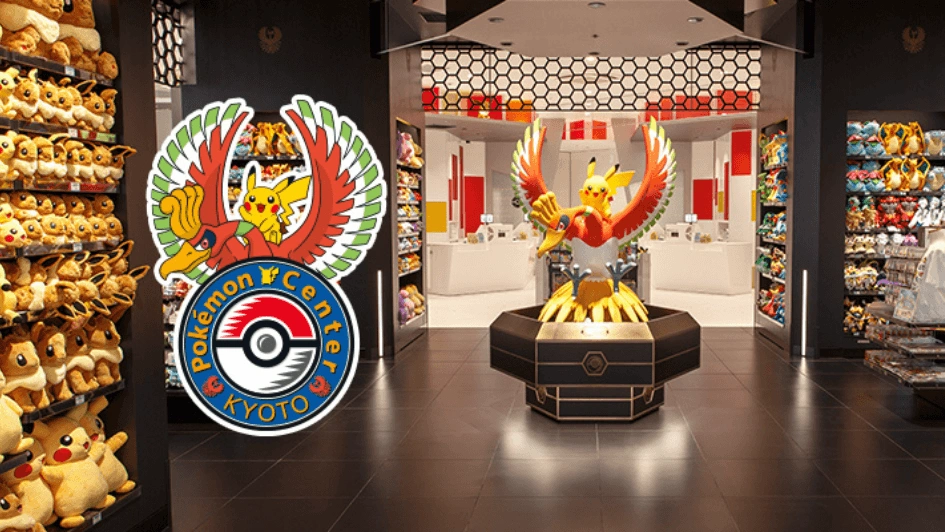
Source: Pokémon Center Online
Again, they were still too popular. So finally, the Pokémon Center launched online. Just one problem - they only ship to Japan. Don't worry! That's where ZenMarket comes in! There’s no need to travel to Japan to buy the Pokémon goods you want from Japan! With our service, you can buy any Pokémon item your heart desires and get it delivered anywhere in the world.
Ordering from the Pokémon Center Tutorial
As the site is entirely in Japanese, it may be hard for those who do not understand Japanese, and that’s why we are here to help you. Here is our quick guide on how to find products on the official Japanese Pokémon Center online store.
We have an English version of the page built into ZenMarket to help you navigate the website - note that links still go to the Pokémon Center website. We'll explain why in just a bit. If you would prefer to browse the site yourself in Japanese, see below:
Step 1. Navigating the Japanese Pokémon Center Website

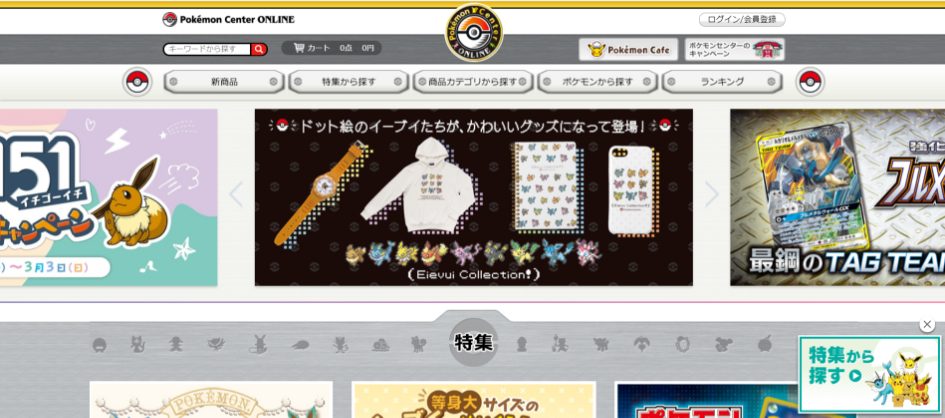
This is the homepage. You should be able to see 5 tabs located near the top of the page to the right of a Pokeball logo.
From left to right, the tabs say:
- ポケモンから探す > “Search By Campaign”
- カテゴリから探す > "Search by Category"
- 新商品 > “New Products”
- おすすめ特集 > “Recommended Features”
- ランキング > “Ranking”
Click on the tab that interests you the most, then click on the banner or product that you would like to take a closer look at.
Serious collectors after the latest Pokémon items from the Pokémon Center should select New Releases (新商品), but for most other people, searching by category or by Pokémon is the best way to go.
If you click or hover over “Search By Category,” you will see 16 different categories appear. Going from top to bottom, here are the translations of each category. Please refer to the image below to see what Japanese word it corresponds with:
- Plushies & Other Toys
- Games
- Pokémon Trading Cards
- Miscellaneous goods and accessories
- Stationery
- Smartphones and PC accessories
- Home Goods
- Apparel
- Kitchen and Wares
- Bags, Pouches and Wallets
- Books and Magazines
- Snack and Food
- Kids and Babies
- Seasonal items
- CDs and DVDs
- Others
As you could imagine, browsing by Pokémon enables you to select a single Pokémon and view all the products available for that Pokémon. This is pretty useful, but given the sheer number of Pokémon there are, the Pokémon Center has included a filter based on the starting character of a Pokémon's name.
This seems helpful, except the Pokémon's names are in Japanese, so be sure to look up the Japanese name for your target Pokémon on Bulbapedia or elsewhere before you start looking.
Also Read: 5 HANDY TOOLS TO FIND JAPANESE PRODUCTS WITHOUT KNOWING JAPANESE
Step 2. Browsing the product page for Pokémon Merch
Once you have found an item that takes your fancy, click on the product, and the item’s page will appear.
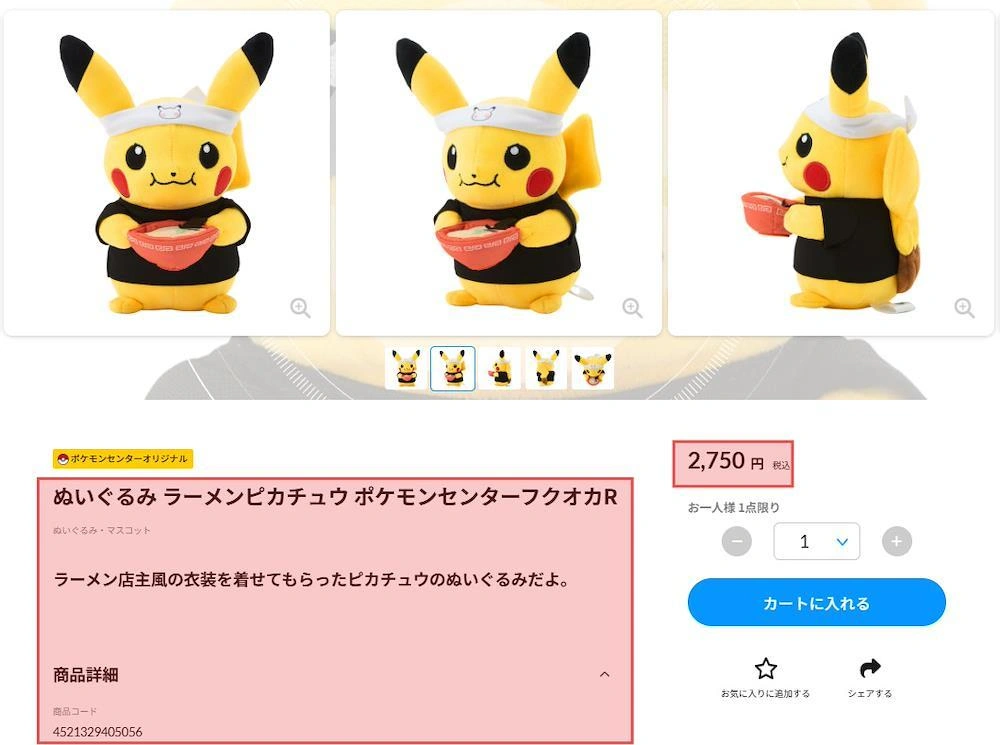
In the above example, you can see that we have highlighted two bits of the item’s description, the price and the number of purchases per customer.
The price for the item is 2750 JPY. The maximum number that can be purchased is 1 (one).
TIP: If you want to try reading this, it may be beneficial to open the page in Google Chrome, right-click and choose "Translate to English" from the menu to automatically translate the webpage.
Important
Some rare items on the Pokemon Online Store are limited to one person per account, so we will be able only to buy one piece of those products.
Once we reach our purchase limit for a store, we will no longer be able to purchase the product. We strongly recommend seeking out alternative stores for limited merchandise, as Pokemon is incredibly popular. For example, if ZenMarket reached our purchase limit on the Pokemon Center website, but the Pokemon Company listed the same item on Rakuten or JDirectItems Shopping we could purchase from those stores as the Pokemon Center website purchase limit does not apply to purchases made from other sites.
Separate limits may apply to those other stores.
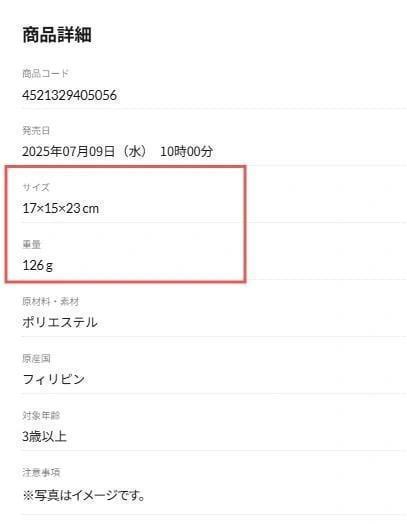
If you scroll down the page slightly you will see more technical information about the product itself, such as size, weight, product code, product material, and country of manufacture. To roughly calculate the cost of international shipping fees, it is recommended that you take note of the weight and dimensions of the item/s you are going to order.
Step 3. Adding the Product to Your Cart in ZenMarket
The next step works best if you already have a ZenMarket account. If you don't have a ZenMarket account yet, you can sign up now for a more seamless experience when you order. It's free, and only takes a few seconds.
Sign Up Now!
To place your order, you do not need to register on the Pokemon Center online site or add any of the products into your cart there. If you do, there will be no way to make the purchase without a Japanese payment method or shipping address.
Also Read: PITFALLS OF JAPAN ONLINE SHOPPING & HOW TO AVOID THEM
Instead, all you have to do is copy the item’s URL and paste it into ZenMarket’s search bar like down below.

The item page will then load on the ZenMarket website. If you are planning to purchase an item that has several different sizes, colors, or models, please write a description of the item that you would like. This will save time when purchasing your item.
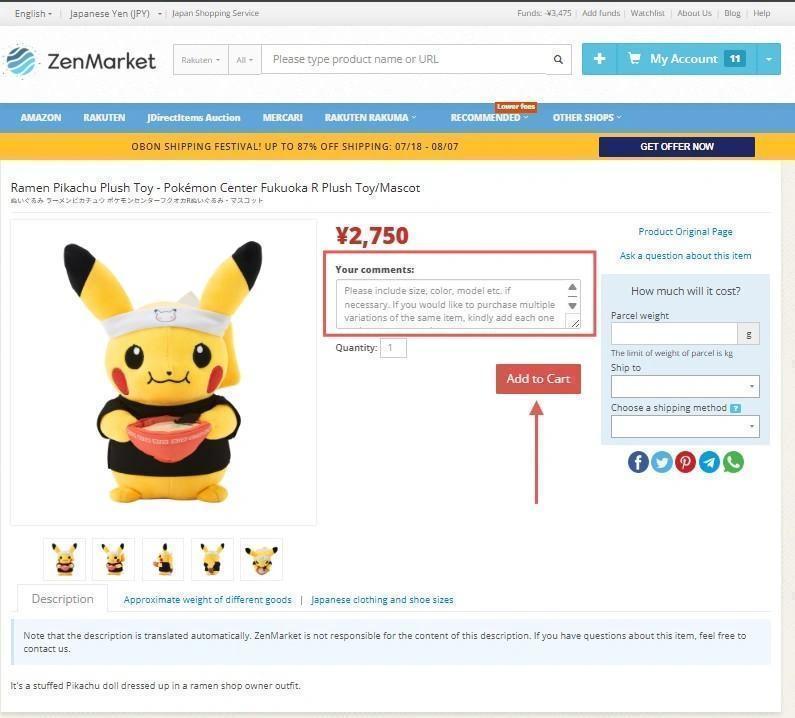
Once you've finished entering any relevant information, click the Add button.
 Note
Note
On occasion, the ZenMarket website will be unable to read the page for a given product. In these cases, a modal will appear instead of the translated product page.
If you take the above steps with the modal (i.e, enter any details, then click add), it will still work as if you had clicked Add to cart.
This will prompt ZenMarket staff to check the item's availability, price, and whether it can be shipped internationally (i.e, it is not a prohibited item). This process can take between 10 minutes to 1 business day depending on order volumes as well as access to information on the supplier's website.
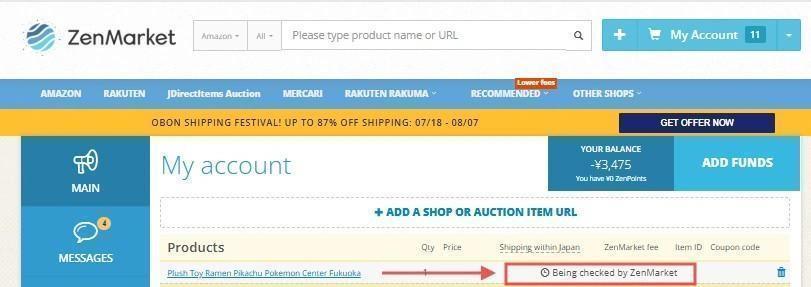
In cases where support need to contact the seller for a particular piece of information, this can take longer, as we need to wait for the supplier to send us a response.
When your item has been checked, you will be able to pay for the item. You will receive a notification via email, explaining the next process of adding funds to your cart. Once your funds have been added to your ZenMarket account, you can click pay from “My Account” to pay for your items.
Once you have paid for the item, our customer support to make the purchase for you. The order will then be shipped to the ZenMarket warehouse, where we can combine it for free with parcels from other orders you may have made, or simply prepare it for international shipping.
Check out our guide on shipping a parcel with ZenMarket.

We hope this guide was helpful to you. If you have any other questions, feel free to send us a message via the user panel of your account.
Happy shopping and catch them all!
Have you already registered on ZenMarket?
ZenMarket is the place where you can purchase goods directly from Japan!
Sign up for free