ZenPoints can be used to pay for eligible purchases, services, shipping, and certain fees on ZenMarket. Depending on what you are paying for, you can choose how many ZenPoints to apply or have your available points used automatically.
This guide explains how to use ZenPoints for different payments on ZenMarket, including product purchases, auctions, additional services, international shipping, and other eligible charges.
New to ZenPoints? Read our introduction to ZenPoints to learn more about the rewards program.
How to Use ZenPoints for Purchases
ZenPoints can be applied toward eligible product and auction purchases. You can use your available points to cover part of a payment rather than paying the entire amount using your ZenMarket account funds.
How do I use ZenPoints to pay for products?
You can use ZenPoints toward eligible product purchases by selecting how many points you would like to apply during the payment process.
- Find the product you want to purchase through ZenMarket and add it to your cart.
- Click the yellow Pay button.
- When the Payment confirmation window appears, you will be able to enter how many ZenPoints you would like to use.
- When ready, click Pay.
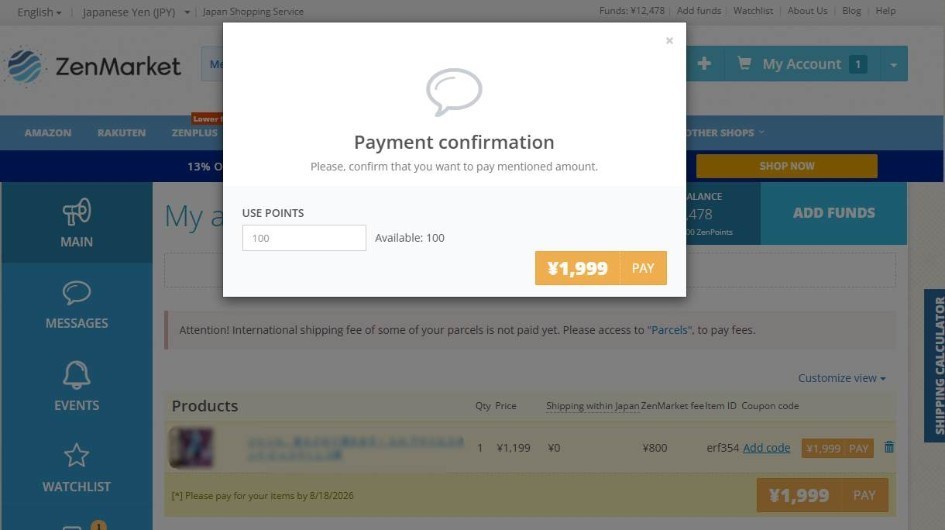
You can combine ZenPoints with other available payment funds, so you do not need enough points to cover the full purchase price.
Also, you can use ZenPoints in combination with coupon codes. To use ZenPoints with a coupon code, simply click Add code before clicking the pay button, and add in your coupon. You can then proceed with the above steps to apply your ZenPoints.
How do I use ZenPoints to pay for auctions?
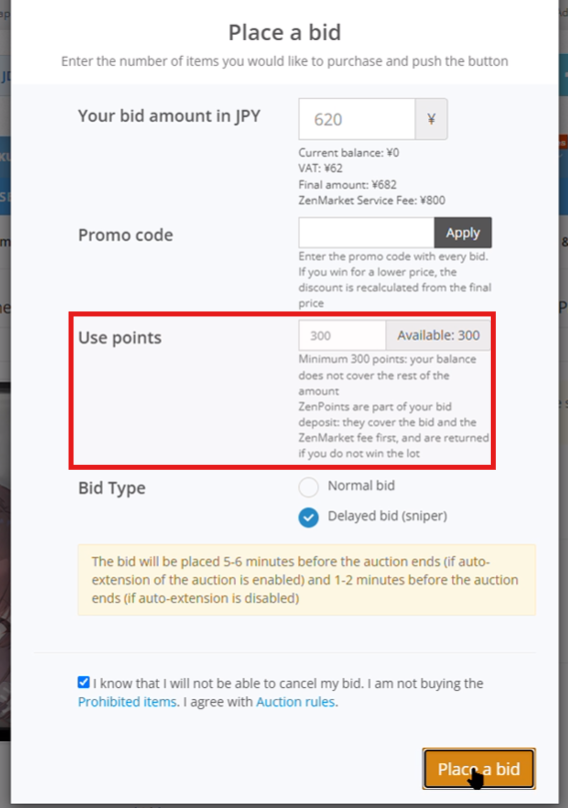
ZenPoints can also be used toward eligible auction purchases on ZenMarket. You can choose to apply available ZenPoints when arranging payment for your auction purchase.
- Click Place a bid on the auction page.
- In the bidding window, enter the number of ZenPoints you would like to use.
- Click Place Bid.
How to Pay for ZenMarket Services with ZenPoints
ZenPoints are not limited to product purchases and shipping. You can also use them toward eligible services and fees associated with your items.
Depending on the service, you may be able to select your ZenPoints directly or request their use through the Messages tab.
Can I use ZenPoints for the Photo Service?
Yes. ZenPoints can be used to pay for ZenMarket's Photo Service, which allows you to request additional photos of your items.
- Request the Photo Service for your item (it must have either the Bought, or At warehouse status) by clicking +Order.
- When the confirmation window appears, enter the number of ZenPoints you would like to use on the photo service.
- Once done, leave any comments for what you would like us to take photos of specifically, confirm if it is ok to open the item, then click Pay.
[Screenshot: Photo Service request and payment process]
How do I pay for parcel reinforcement with ZenPoints?
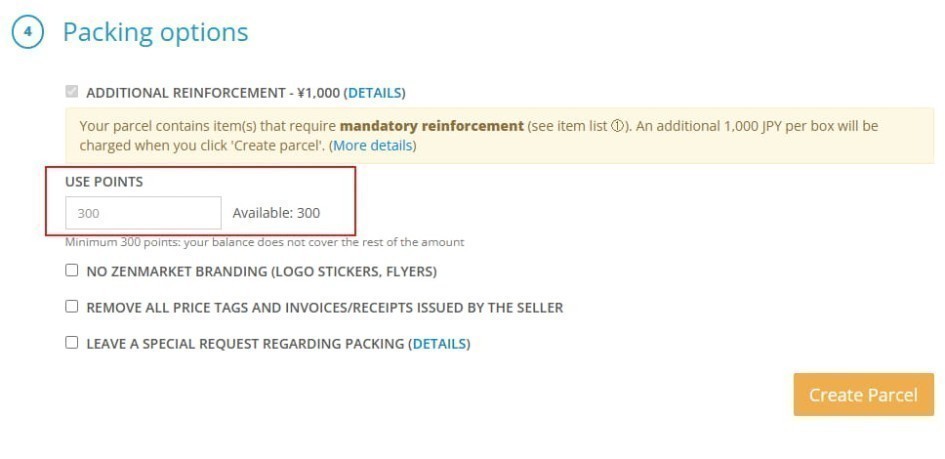
You can use ZenPoints to pay for reinforcement services, which provide additional protection for your parcel during shipping.
- Go to the Parcels tab on your account and click Create a new parcel
- Choose the items you want to ship, fill in your shipping details, then choose a shipment method and packing strategy.
- Under the packing options, choose parcel reinforcement and enter the number of points you would like to use on reinforcement.
- Click pay to confirm.
Can I use ZenPoints to pay parcel cancellation fees?
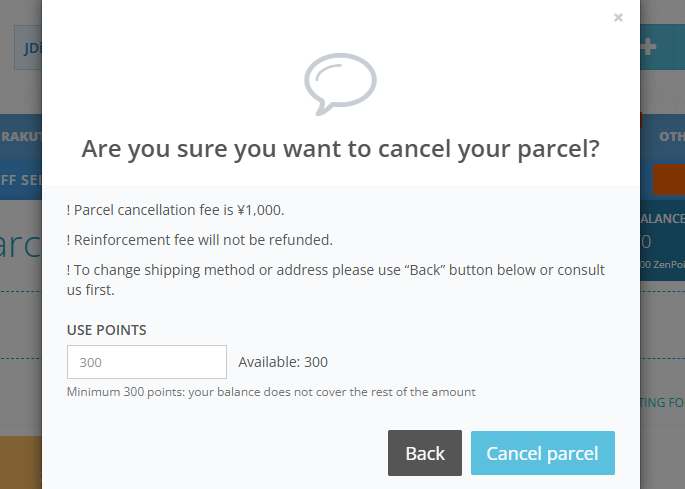
Yes. ZenPoints can be used toward eligible cancellation fees on ZenMarket.
- Go to the Parcels tab on your account and find the parcel you would like to cancel.
- Click "Edit or Cancel", then in the window that appears choose the Cancel parcel option.
- In the confirmation window, enter the number of ZenPoints you would like to put towards the cancellation fee.
- Click "Cancel parcel" to confirm.
How do I use ZenPoints for item disposal or battery removal?
ZenPoints can be used toward eligible disposal services, including the disposal of an entire item or the removal of individual components such as batteries.
To do this, simply request the relevant disposal or removal service via the messages tab on your account. For this it is strongly recommended that you include the item code.
In your request, be sure to specify that you would like to use ZenPoints, and how many you would like to use.
As the disposal service cost varies based on the actual time it takes to complete, if the amount of ZenPoints you specified is not enough to cover the entire disposal fee, the difference will be taken from your account balance. Depending on the number of points and the amount of funds you had available, there may be some situations where your account receives a negative balance.
[Screenshot: Disposal service request or payment process]
How to Use ZenPoints for International Shipping
ZenPoints can be used toward international shipping costs when sending your parcel from Japan.
Previously, available ZenPoints were applied automatically toward shipping payments. Now, you can choose how many ZenPoints to use, allowing you to save the remaining points for other eligible payments.
How do I choose how many ZenPoints to use for shipping?
- Prepare your parcel and proceed to international shipping payment by clicking the Review & Pay button on the parcel.
- When the payment confirmation window appears, select how many points you want to apply.
- Once you are done, click pay to confirm your payment.
You can use some of your points toward shipping and keep the rest for future purchases or services.
If you have a shipping discount code, you can apply this by simply entering the code at the same time that you choose the number of ZenPoints to use.
[Screenshot: International shipping ZenPoints selection]
How Automatic ZenPoints Payments Work
Some fees are handled differently from purchases and services. Instead of manually selecting how many points to use, available ZenPoints are automatically applied when your ZenMarket account balance reaches zero, before it becomes negative.
This applies to item overstay fees, eligible domestic seller to ZenMarket shipping charges that are confirmed after the purchase, and other automatic fees.
Can ZenPoints automatically pay parcel overstay fees?
Yes. If your items remain in storage beyond the applicable free storage period and item overstay fees are charged, available ZenPoints can automatically be used when your account balance reaches zero.
You do not need to manually select your ZenPoints for these charges.
Can I use ZenPoints for domestic shipping from the seller to ZenMarket?
Yes. ZenPoints can be applied towards domestic shipping charges to get the item from the seller to the ZenMarket warehouse. For the vast majority of stores, this will occur at the same time that you pay for the item.
On some fleamarket sites, there are situations where the shipping fee is not known at the time of purchase due to the seller needing to confirm ZenMarket's address, and even shipping method. In these situations, when the seller confirms the shipping fee, you will be charged first from your account funds, and then ZenPoints balance once your funds balance reaches zero.
These payments are handled automatically, so you do not need to choose how many points to apply.
Please note that if an automatic payment depletes both your account funds and ZenPoints balance, your account will go into negative balance. If this happens you will need to top yourself up to a positive balance in order to ship your parcels.
If you are planning on saving your ZenPoints for a special treat later down the line, be sure to have some reserve funds deposited so that there is enough to cover shipping from the seller. You will use these funds later when it is time to organize international shipping, and you can always withdraw any leftover funds anyway so no need to worry.
ZenPoints Payments and Refunds: Frequently Asked Questions
Can I combine ZenPoints with other payment methods?
Yes. For eligible purchases, you can combine ZenPoints with other available payment funds. Applicable coupons can also be used alongside ZenPoints.
This means you do not need enough ZenPoints to cover the full cost of an item.
What happens to my ZenPoints if a purchase is refunded?
If ZenPoints are used toward an item purchase and the ZenPoints portion of that payment is refunded, those points are returned as ZenPoints, rather than being converted into ZenMarket account funds.
Can I use ZenPoints in combination with loyalty credit?
Yes. ZenPoints, account funds, coupons, and credit can all be applied in a single transaction if you wish.
Credit is only used after both account funds and ZenPoints are completely depleted.
Making the Most of Your ZenPoints
ZenPoints can be used across several stages of your ZenMarket shopping experience, from purchasing products and auctions to paying for additional services and international shipping.
For most eligible payments, you can choose how many points to use. Certain fees, including storage overstay fees and domestic COD shipping, use available ZenPoints automatically when your account balance reaches zero.
Understanding these different payment methods will help you decide when to use your points and when to save them for another purchase or service.